Background processing
Next SaaS uses ServiceStack Background Jobs for work that must survive request completion, retry safely, run later, or be inspected by operators.
When to use a job
Use a Background Job when work is dependent on an external provider, slow or variable in duration, scheduled for later, safely retryable, destructive with visible progress, or periodic maintenance.
Keep small transactional database changes inside the request when the caller needs an immediate result. Do not enqueue merely to avoid defining correct transactional behavior.
Command model
A job is a registered command with a small request payload:
public class DeleteStoredFileWork
{
    public string WorkspaceId { get; set; } = default!;
    public string FileId { get; set; } = default!;
}

[Worker("storage")]
public class DeleteStoredFileCommand(IDbConnectionFactory dbFactory, ...) : AsyncCommand<DeleteStoredFileWork>
{
    protected override async Task RunAsync(DeleteStoredFileWork request, CancellationToken token)
    {
        // Confine the connection to the organization before reading anything
        using var db = dbFactory.OpenForWorkspace(request.WorkspaceId, "file-deletion-job");
        var row = db.SingleById<StoredFile>(request.FileId);   // null if the file is not this organization's
        // Reload current state, then act idempotently.
    }
}
Register the command in Configure.BackgroundJobs.cs, then enqueue it through IBackgroundJobs:
jobs.EnqueueForWorkspace<DeleteStoredFileCommand>(scope.Workspace.Id, new DeleteStoredFileWork {
    WorkspaceId = scope.Workspace.Id,
    FileId = row.Id,
});
EnqueueForWorkspace() sets the job's TenantId to its organization, so an organization's jobs can be found in the jobs dashboard.
Pass the organization and stable identifiers, not a serialized authorization decision or mutable customer record. Workers must reload current state.
Worker queues
[Worker("name")] assigns commands to a logical queue where serialized or specialized processing is useful. The template uses named workers for storage and notifications. Choose queue names by operational workload, not by customer; avoid creating an unbounded queue per organization.
Recurring commands
The host registers recurring work after ServiceStack initialization:
| Command | Schedule | Purpose |
|---|---|---|
ExpireUsageReservationsCommand | Hourly | Release abandoned admission capacity |
BuildUsageRollupsCommand | Hourly | Rebuild daily usage projections |
BuildSaasDailySnapshotCommand | Hourly | Record the day's operator metrics and MRR/ARR history |
QueueQuotaNotificationsCommand | Hourly | Turn quota thresholds into notification intents |
ProcessDueWorkspaceLifecyclesCommand | Hourly | Enqueue delayed organization operations |
ExpireDataExportsCommand | Hourly | Delete expired archive objects and retain expiry evidence |
ReconcileStripeSubscriptionsCommand | Hourly | Repair local Stripe subscription projections |
ApplyDataRetentionCommand | Daily | Prune eligible data in bounded batches |
Recurring commands must be safe when invocations overlap or a prior run partially completed.
Persist intent before enqueueing
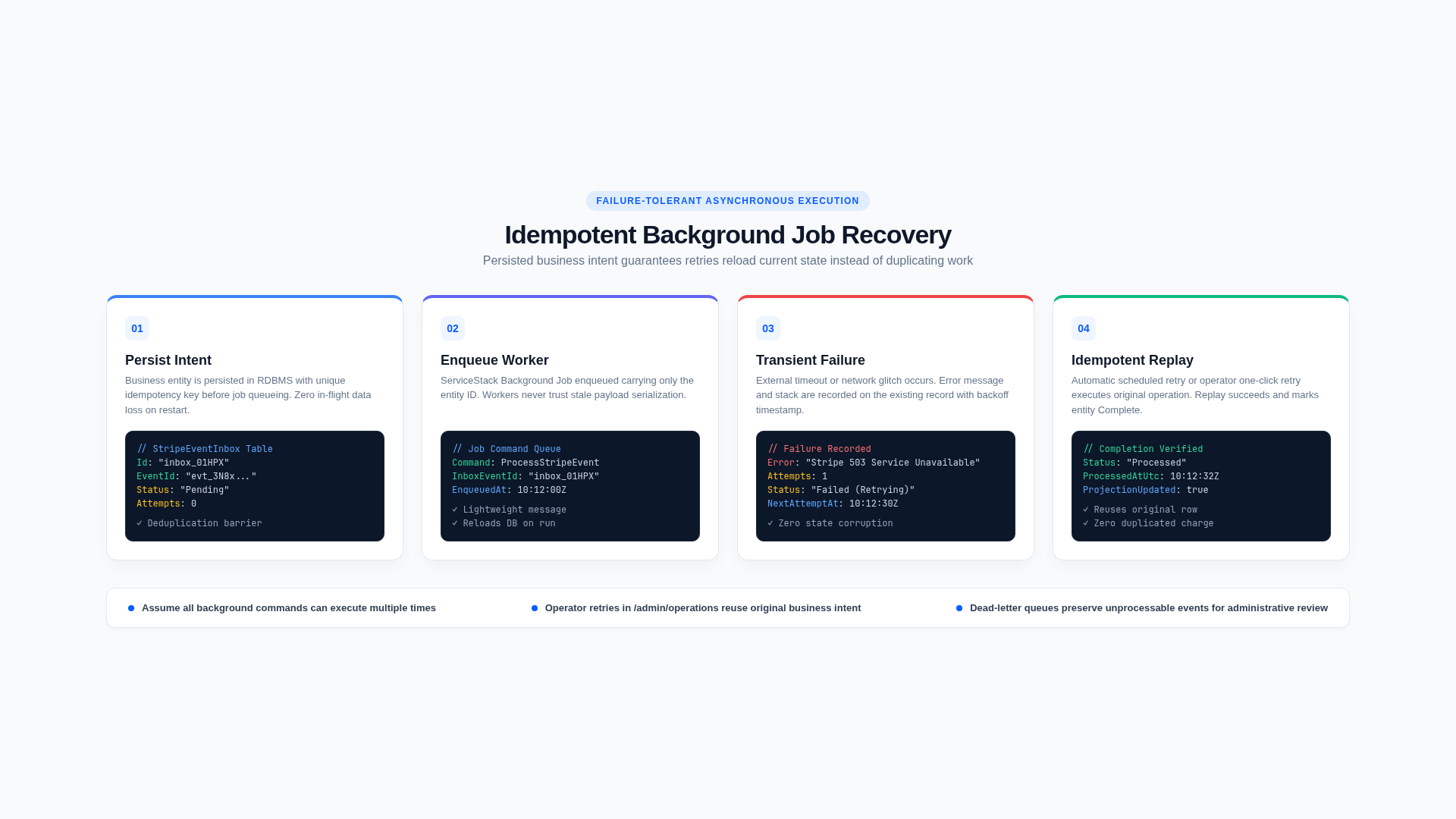
For important workflows, the database row is the source of truth and the queue is a delivery mechanism:
- Authorize the request.
- Persist operation, status, user, and idempotency/deduplication key.
- Commit the transaction.
- Enqueue the organization and row ID.
- Have the worker reload and claim current state.
This pattern is used for Stripe inbox events, notifications, stored files, and workspace lifecycle requests. A periodic scanner can re-enqueue due persisted work if an enqueue was lost.
Idempotency and replay
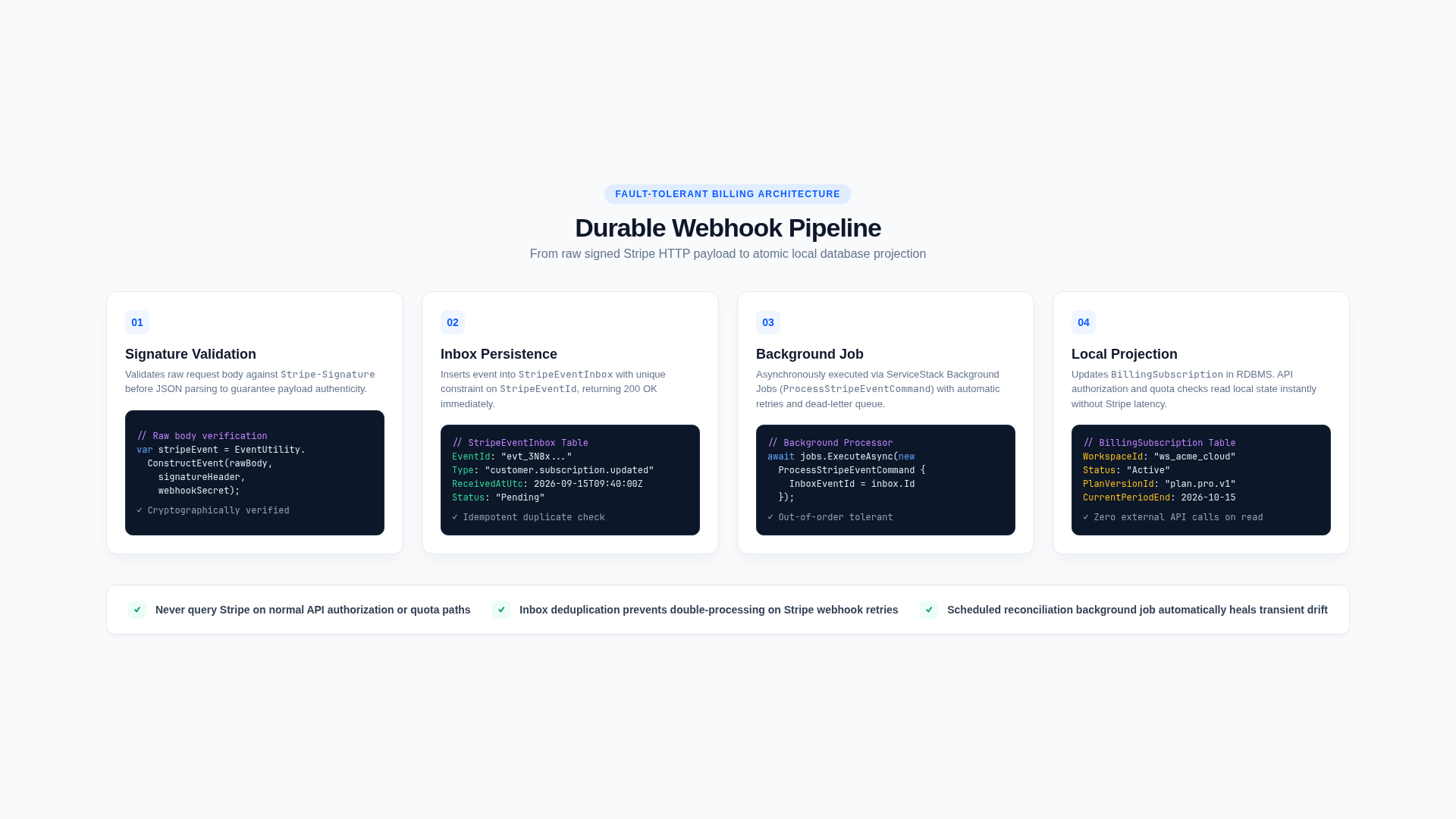
Assume a command may execute more than once. A safe worker:
- returns when the target is already complete;
- validates the current state transition;
- uses stable provider idempotency or deduplication keys;
- does not double-apply usage adjustments;
- makes object deletion idempotent;
- records completion only after required effects succeed;
- retains enough state and error detail for diagnosis.
Operator retry APIs enqueue the same persisted operation rather than inventing a new business action.
Tenant and authorization safety
Authorization happens when the customer requests an operation, but the worker still reloads current tenant state. A queued identifier is not trusted input.
A job is not run for a request, so it opens its own connection and says whether it is confined to an organization. A job that is given only a row ID, and looks the row up to find its organization, trusts that ID completely. So work for one organization carries the organization in its payload, and the command opens a connection confined to it before it reads anything:
using var db = dbFactory.OpenForWorkspace(request.WorkspaceId, "lifecycle-job");A request for another organization's row is then treated as if it does not exist, and nothing the command does afterwards can reach another organization, however it is written. The second argument is the job's name, which is recorded in the audit columns of the rows it writes.
A job that sweeps every organization opens its connection with dbFactory.OpenAcrossWorkspaces("retention-job") and keeps explicit WorkspaceId conditions. ArchitectureGuardTests limits it to an allow-list of reviewed files, and fails when a connection is opened with dbFactory.Open(), so a job cannot be left unconfined by forgetting a call.
Jobs that process every organization have two shapes:
| Shape | When | Example |
|---|---|---|
| One organization at a time, on a connection confined to it | The work reads and writes an organization's rows | BuildUsageRollupsCommand lists the organizations with recent usage, then builds each one's rollups on its own connection. Stripe events, subscription reconciliation and quota notifications work the same way |
| One statement across organizations, with explicit conditions | A sweep by a condition | ExpireUsageReservationsCommand, ApplyDataRetentionCommand |
The first also bounds memory by the largest organization rather than the total.
Recheck policy that may change during a delay. Organization deletion checks legal hold at request time and again in the worker. File jobs derive their object key from the organization-owned database row rather than accepting it from the browser.
Quota reservations in jobs
When asynchronous work consumes limited capacity:
- Reserve maximum bounded capacity before enqueueing.
- Persist the reservation or product record ID.
- Settle actual usage on success.
- Release it on terminal failure or cancellation.
- Use expiry cleanup as a final safety net.
A retry must not create a second reservation for the same logical operation.
Errors and operations
Commands store status, attempts, and a bounded last error on the domain or inbox record. /admin/operations surfaces failed Stripe events, notifications, and lifecycle work to the appropriate platform role. ServiceStack Admin provides the underlying job view.
Telemetry counts business outcomes. Customer-facing errors and logs share X-Request-Id for correlation. If a failure is intentionally non-fatal, persist a diagnostic or audit event that makes the lost side effect visible.
Cancellation and shutdown
Pass the supplied CancellationToken through file, network, and provider operations. Cancellation may interrupt any await, so persisted state and idempotency must permit a later retry.
Do not use in-memory timers or fire-and-forget tasks for customer workflows. They disappear when the process restarts.
Adding a command
- Define a minimal request containing the organization and stable IDs.
- Implement
AsyncCommand<T>and choose a worker queue if needed. - Register it with dependency injection.
- Persist business intent before enqueueing.
- Add a recurring scanner if future scheduling or recoverable delivery requires it.
- Expose bounded status and operator retry behavior where useful.
- Add audit and telemetry at business transitions.
- Test replay, partial failure, cancellation, isolation, and terminal state.
- Add the job to its module in
features.json.
Common mistakes
- Passing an entire customer object into a job and trusting its stale status.
- Opening a connection in a job for one organization without confining it.
- Treating enqueue success as business completion.
- Performing provider work without idempotency.
- Making retries duplicate usage or notifications.
- Holding an HTTP request open for a large export.
- Using an in-process timer for durable work.
- Omitting failed work from operator visibility.
Related concepts
Usage and quotas
The quota system separates immutable evidence of consumption from fast, transactionally updated admission state. It enforces limits locally without relying on Stripe aggregation.
Billing and subscriptions
Stripe owns financial state; Next SaaS maintains a local subscription projection for fast, deterministic access decisions.