Coupons and promotion codes
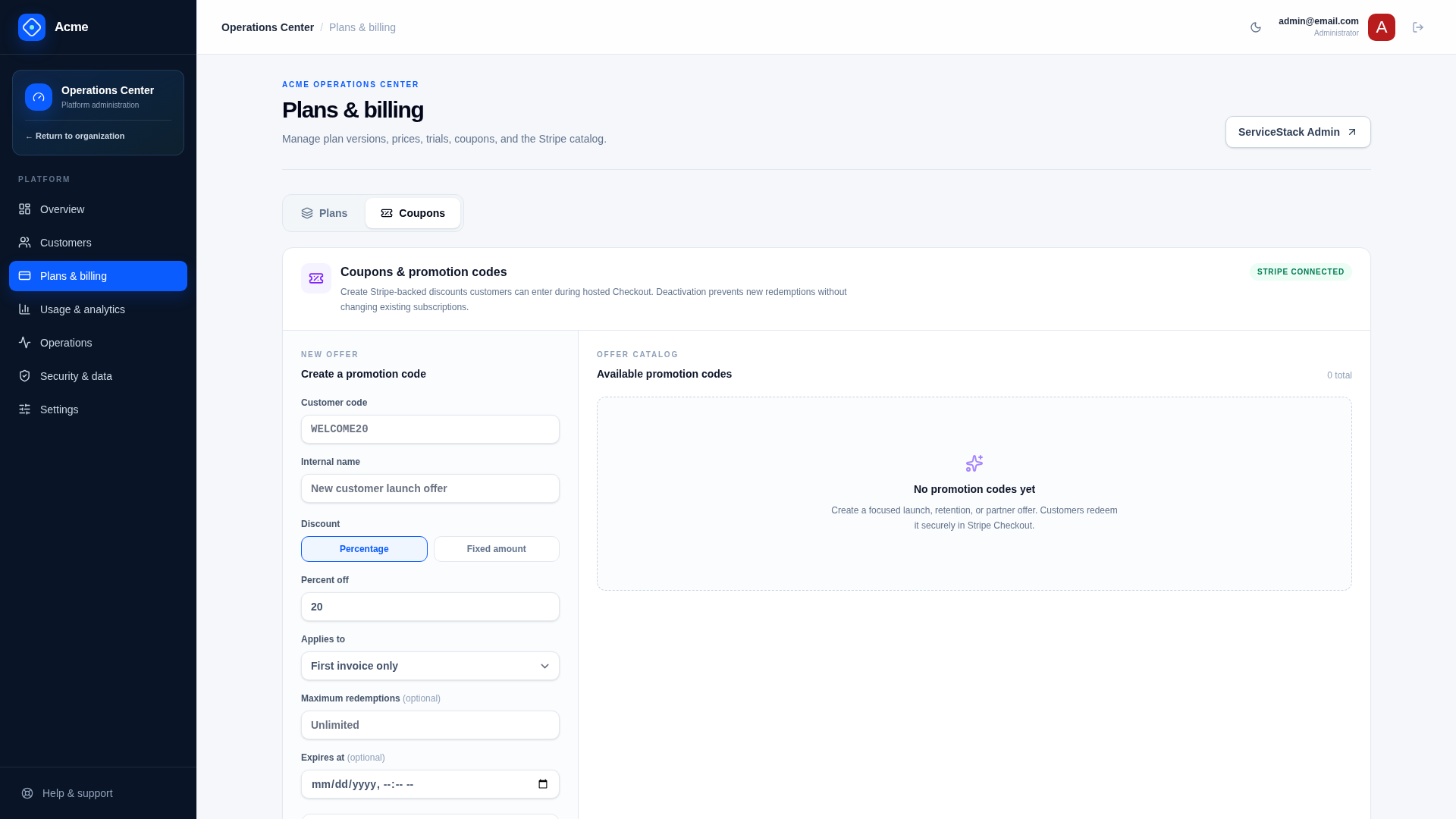
The template lets SaaS Admin users create Stripe Coupons together with customer-facing Promotion Codes and deactivate those codes later.
Admin experience
Open /admin/plans and select the Coupons tab. Coupon management is deliberately separate from the Plans tab so changing a reusable discount cannot be confused with editing or publishing a plan version. The Coupons panel and its API request are loaded only while that tab is active.
Behavior
Checkout displays Stripe’s promotion-code entry. Customers enter a readable code; Stripe validates eligibility, duration, redemption limits, and expiry and applies the discount to the Subscription or invoice.
Discount definitions and redemption state remain in Stripe. The local application does not maintain a second redemption ledger.
APIs
GET /saas/admin/coupons— list template-visible Stripe promotion codes and coupon details.POST /saas/admin/coupons— create Coupon and Promotion Code.POST /saas/admin/coupons/{PromotionCodeId}/deactivate— prevent future redemption.
All require platform Admin.
Discount options
A coupon supports exactly one discount form:
- percentage off;
- fixed amount off plus currency.
Duration may be:
Once— first applicable invoice;Forever— every applicable recurring invoice;Repeating— a configured number of months.
Promotion codes can also set maximum redemptions, an expiry, and first-transaction-only eligibility.
Validation
Codes and names are required. Percentage and amount are mutually exclusive. Fixed discounts require a supported currency. Repeating discounts require a valid month count. Expiry must be meaningful for a new code.
Use codes customers can reliably read and type. Treat a published code as customer-facing even if it has not yet been redeemed.
Audit and provider state
Creation and deactivation are recorded in the local SaaS audit trail with the acting Admin. Stripe remains authoritative for validity, active state, live/test mode, redemptions, and discount calculation.
Deactivation is preferred to destructive deletion because it preserves financial history and prevents future use.
Failure modes
- Stripe unavailable or unconfigured: return a provider/configuration error without a local coupon.
- Duplicate code: Stripe rejects the new Promotion Code.
- Currency mismatch: fixed discount may not apply to a differently denominated Checkout.
- Code deactivated after attachment: existing Stripe discount behavior follows Stripe’s Coupon/Promotion Code semantics; deactivation prevents new redemption.
Extension points
For campaign attribution, store non-sensitive campaign metadata separately and correlate using Stripe IDs. For customer-specific negotiated pricing, prefer a plan/contract workflow rather than distributing a public promotion code.
Verify
Create percentage, fixed, once, repeating, expiring, capped, and first-purchase codes in sandbox. Complete eligible and ineligible Checkouts, confirm invoice totals in Stripe, deactivate the code, and verify audit events.
Related documentation
Plans, pricing, and trials
Plans are versioned commercial contracts containing prices, features, quotas, and optional trial duration.
Organizations and members
Organizations isolate customer data, subscriptions, quotas, files, API keys, settings, and lifecycle operations. One user can belong to several organizations.