Verify and ship
The final onboarding step turns a working development change into a deployment that fails early when required infrastructure or secrets are missing.
1. Run the complete verification suite
From the repository root:
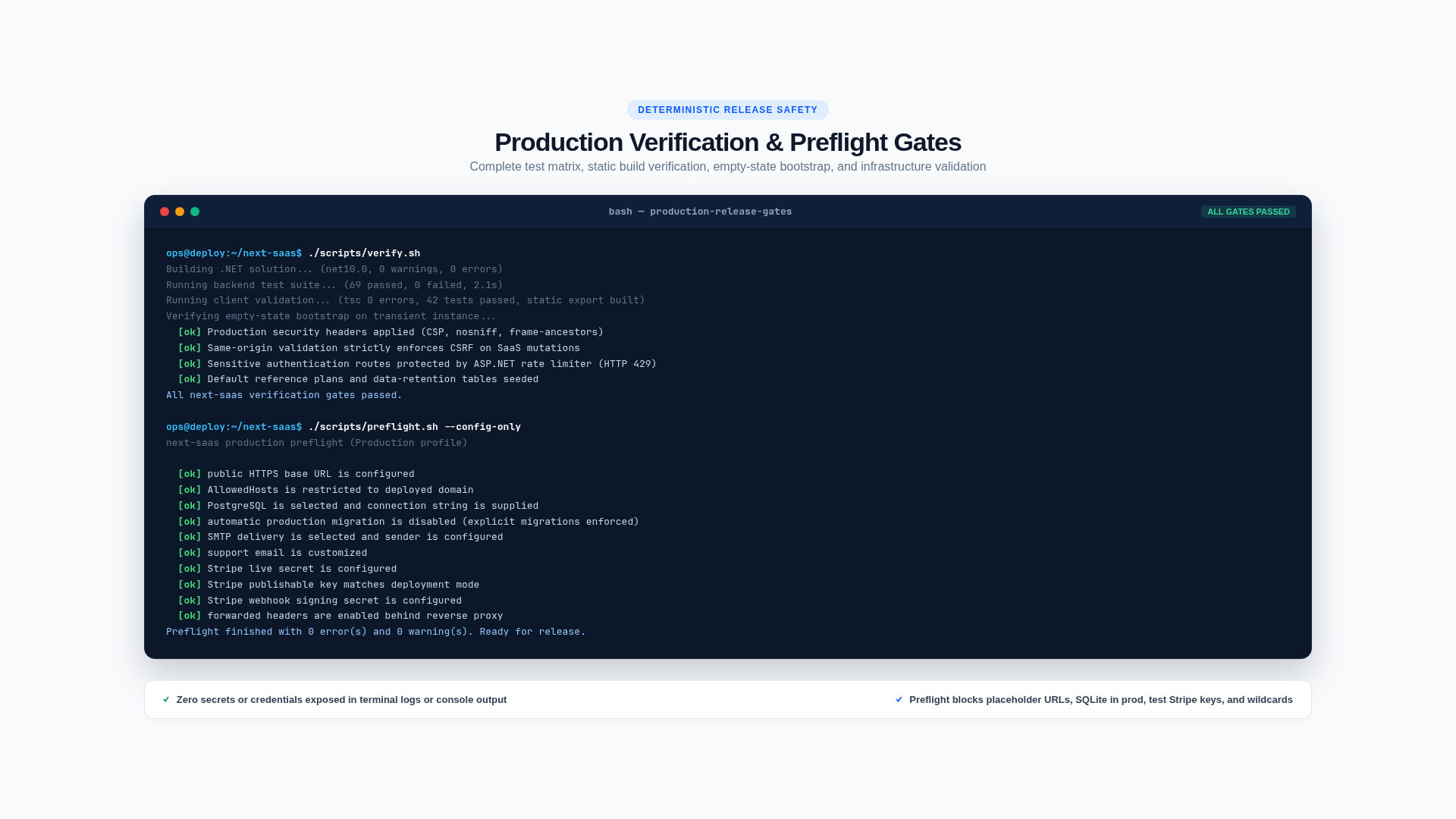
./scripts/verify.shThe script runs:
- .NET restore/build and backend tests;
- TypeScript checking and frontend tests;
- the production static Next.js export;
- a temporary Production host against a completely empty SQLite database and file store;
- readiness and clean-schema seed assertions.
The verification harness explicitly disables production-policy enforcement because it is testing deterministic empty-state construction with isolated local infrastructure. It does not weaken a normal Production start.
2. Choose a deployment profile
Start with one of the checked-in JSON profiles rather than assembling configuration from scratch:
| Profile | Best for | Database | External services |
|---|---|---|---|
appsettings.deploy.sqlite.example.json | First Kamal/domain/TLS validation | Durable SQLite, one instance | SMTP and Stripe optional |
appsettings.deploy.postgres.example.json | Real production operation | PostgreSQL | SMTP and Stripe required |
The SQLite profile is a supported validation path, not a horizontally scalable production architecture. The PostgreSQL transition is configuration-only for a new/empty deployment; an existing data-bearing SQLite database needs a planned data migration.
3. Choose production infrastructure
The default production policy expects:
- an HTTPS public origin;
- a restricted
AllowedHostsvalue; - PostgreSQL with an explicit connection string;
- SMTP for invitations and account recovery;
- Stripe publishable, secret, and webhook keys;
- live Stripe keys unless test mode is explicitly allowed for staging;
- a writable persistent file store.
The included local file store requires a persistent mounted volume. For horizontally scaled or ephemeral deployments, implement IFileStore using object storage such as S3, R2, or Azure Blob Storage.
4. Supply production configuration
Use a JSON profile, environment variables, or your deployment platform’s secret store. The Kamal workflow accepts the complete JSON document through the APPSETTINGS_JSON repository secret. Never commit the populated file.
cp config/appsettings.deploy.sqlite.example.json MyApp/appsettings.Production.json
# Replace the example host and email values, then validate it.
./scripts/preflight.sh --json MyApp/appsettings.Production.json --config-only
Files matching appsettings.Production.* are gitignored. To begin directly with PostgreSQL, copy config/appsettings.deploy.postgres.example.json instead.
Customize the profile's BootstrapAdmin email and password for the first release. Migration creates that platform administrator idempotently. Once the administrator can sign in, remove the entire section, upload the revised GitHub secret, and redeploy so the bootstrap password is no longer present at runtime.
Core non-secret settings include:
ASPNETCORE_ENVIRONMENT=Production
AppConfig__BaseUrl=https://saas.your-domain.com
AllowedHosts=saas.your-domain.com
ASPNETCORE_FORWARDEDHEADERS_ENABLED=true
Database__Provider=PostgreSql
Notifications__Provider=Smtp
Product__SupportEmail=support@your-domain.com
Secrets include the database password, SMTP credentials, Stripe secret and webhook keys, and any non-OSS ServiceStack license. Do not expose secrets through NEXT_PUBLIC_ variables or browser bundles.
5. Run production preflight
For the JSON profile used by Kamal:
./scripts/preflight.sh --json MyApp/appsettings.Production.jsonThis validates the effective policy without printing secret values, then runs the full verification suite. Use --config-only when CI has already verified the exact revision.
For environment-variable based deployments, load the intended environment instead:
Load the intended deployment environment, then run:
set -a
source .env.production
set +a
./scripts/preflight.sh
To validate environment configuration only when CI has already built the exact revision:
./scripts/preflight.sh --config-onlyThe checked-in SQLite profile deliberately relaxes only the networked-database, SMTP, and Stripe requirements and reports warnings. Do not broadly disable checks outside an intentional deployment profile.
6. Apply migrations explicitly
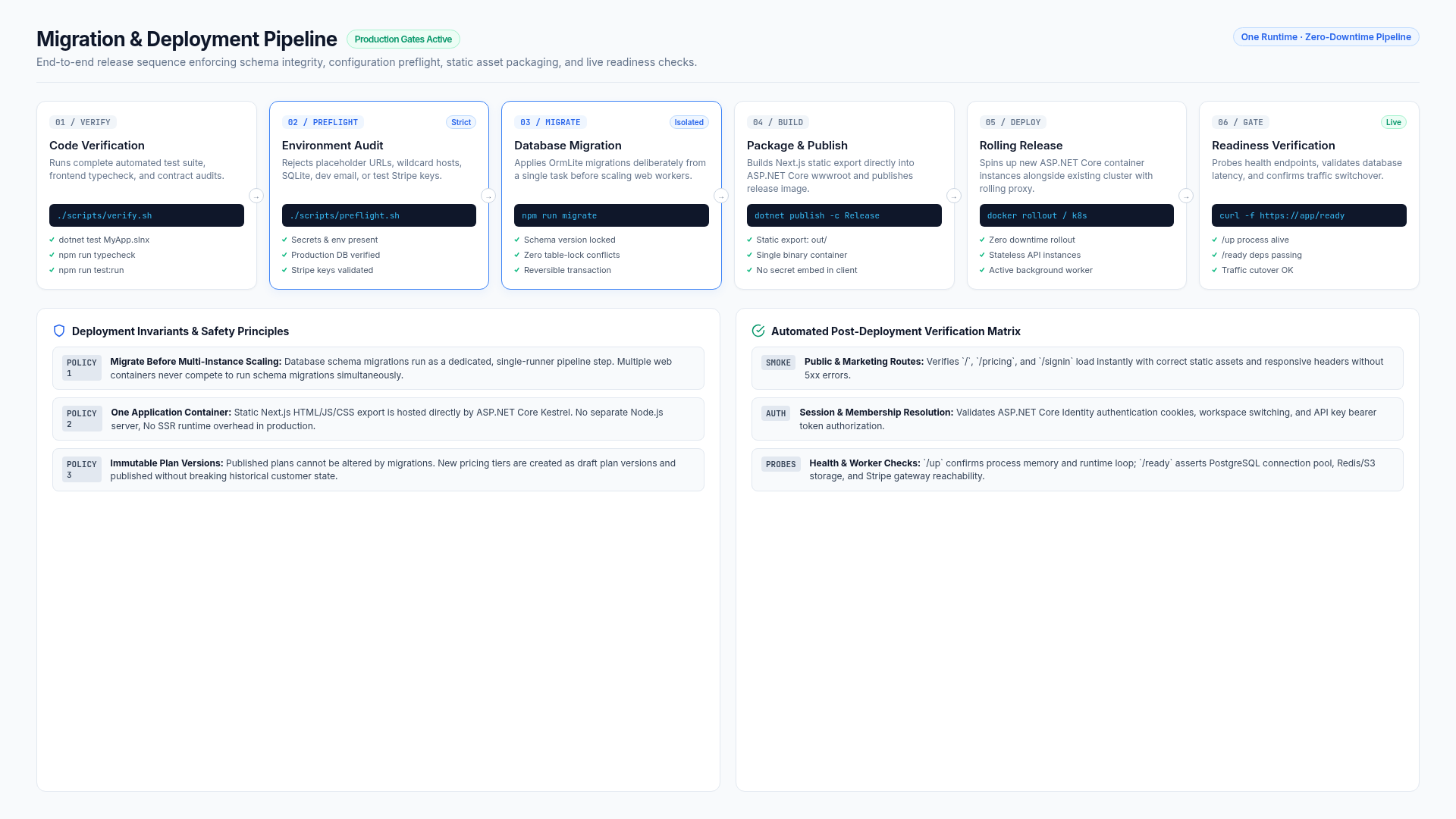
An empty database bootstraps itself on first start. Later migrations are a release step, applied before starting multiple application instances:
cd MyApp
dotnet run --no-launch-profile --AppTasks=migrate
Use the same environment and database connection as the deployment. Back up an established database before applying derived-product migrations. The template’s development reset workflow is not a production migration strategy.
7. Build and publish
The project publish target builds the static Next.js application and copies it into the ASP.NET Core wwwroot. A production deployment runs one ASP.NET Core process; it does not require a Next.js server.
cd MyApp.Client
npm run publish
Or publish the host directly with your desired runtime/container options:
dotnet publish MyApp/MyApp.csproj -c ReleaseThe included config/deploy.yml is a reusable Kamal starting point. It declares Production, forwarded headers, persistent App_Data, TLS proxying, and /up health checks. It deliberately declares no database accessory: the provider is selected separately with the DB_PROVIDER repository variable, described in Choose a database. Adapt its secrets and storage architecture before use.
8. Validate the deployment
Immediately after rollout, confirm:
/upis healthy for process liveness;/readycan query the database and write/delete a file-store probe;- the public site and Identity pages use HTTPS and the correct brand;
- registration confirmation, invitations, and password recovery deliver through SMTP;
- Stripe webhook delivery succeeds against the public
/stripe/webhookendpoint; - a sandbox or controlled production checkout updates the local subscription projection;
- Background Jobs are running and recurring jobs are registered;
/admin/operationsshows no failed Stripe, notification, or lifecycle work, and/admin/securityshows healthy retention operations;- logs contain the
X-Request-Idreturned to the browser; - database and file-store backups are configured and restorable.
Use /up for a cheap proxy/container liveness probe. Use /ready for traffic admission where the platform supports distinct readiness checks.
9. Know the safe defaults
A normal Production start evaluates Deployment policy before serving traffic. Unsafe checked-in defaults produce one consolidated error listing every missing requirement. Development startup remains zero-config.
Production request logging does not retain request bodies. Responses include X-Request-Id, and the same identifier is attached to the logging scope and audit-capable requests. SaaS counters and traces use the stable MyApp.Saas diagnostics source for an OpenTelemetry or vendor listener.
Release checklist
./scripts/verify.shpasses for the release revision../scripts/preflight.shpasses with production configuration.- Database migration succeeds before application rollout.
- Secrets exist only in the deployment secret store.
- Domain, HTTPS, allowed hosts, and forwarded headers are correct.
- SMTP and Stripe webhook delivery are tested.
- Storage is persistent and suitable for the deployment topology.
- Backup restoration and customer export/deletion workflows are tested.
- Operator roles follow least privilege.
- Support access is disabled or deliberately configured and audited.
You now have a working development loop and a production boundary. Continue into the task-oriented reference documentation from the documentation home.
Connect Stripe sandbox
Use Stripe sandbox mode until plan creation, trials, checkout, webhooks, renewals, failures, cancellation, and the Customer Portal all behave correctly.
Architecture
Next SaaS is a single-runtime SaaS application. ASP.NET Core and ServiceStack own authentication, APIs, persistence, billing projection, background work, and production hosting. Next.js supplies an exported React client rather than a second production server.