Configuration
Next SaaS uses ASP.NET Core configuration. Checked-in JSON provides safe development defaults; environment-specific values override it with double-underscore keys.
Operations · Customize the product
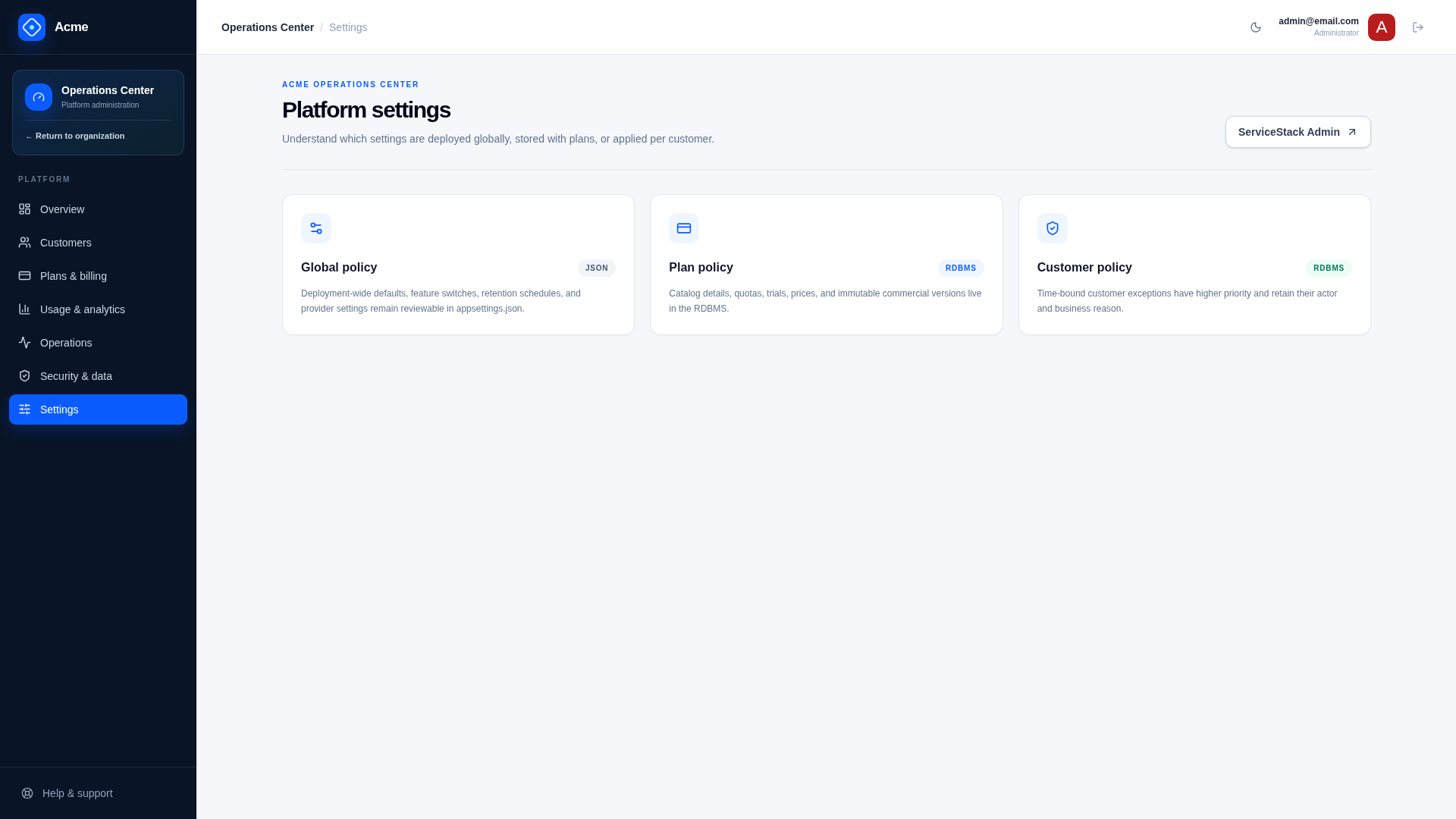
Ownership rules
| Scope | Storage | Examples |
|---|---|---|
| Deployment-wide behavior | JSON/environment | URLs, currencies, retention defaults, feature registry |
| Secrets | secret manager/environment | Stripe secret, webhook secret, SMTP password, DB password |
| Commercial plan state | RDBMS | prices, trials, features, quotas, Stripe Price IDs |
| Organization exception | RDBMS | entitlement override, retention policy, legal hold |
The Admin UI may display global capabilities but does not mutate global JSON. This keeps infrastructure policy reviewable and avoids settings that differ silently between application instances.
Main sections
AppConfig— canonical public base URL.AllowedHosts— accepted host header values.DatabaseandConnectionStrings— provider, migration behavior, connection.Deployment— fail-closed production requirements.Security— response headers, cookie-API same-origin policy, and authentication throttling.Product— deployment-wide name, description, contacts, and legal links.FileStorage— local implementation root and upload safety limits.NotificationsandSmtpConfig— delivery mode and sender/provider settings.Saas— global lifecycle, access, retention, feature, and meter policy.Stripe— client/server keys, webhook secret, portal, and catalog provisioning policy.
See .env.example for environment names without real credentials, or start with the provider profiles in config/ when deploying through Kamal.
The Security section provides EnableSecurityHeaders, RequireSameOriginForCookieApi, AuthenticationRequestsPerMinute, and the production ContentSecurityPolicy. Keep the two enforcement switches enabled unless an equivalent upstream control is implemented and tested.
Environment overrides
Nested JSON keys use __:
AppConfig__BaseUrl=https://saas.example.com
Database__Provider=PostgreSql
ConnectionStrings__DefaultConnection='Host=db;Database=acme;Username=acme;Password=...'
Notifications__Provider=Smtp
Stripe__SecretKey=sk_live_...
Set ASPNETCORE_ENVIRONMENT=Production explicitly. Behind a trusted reverse proxy, enable forwarded headers so HTTPS redirects and generated URLs use the public scheme.
The private .env in Development
In Development the application also applies the gitignored .env beside the solution, using the
same keys. That is where a developer's local overrides belong — the database
./scripts/dev-db.sh up writes, sandbox Stripe keys, a different SMTP mode — so that
MyApp/appsettings.json and MyApp/appsettings.Development.json stay at the defaults a new
clone starts from.
Precedence follows Dotenv semantics: a variable already set in the environment wins over .env,
which wins over the JSON settings files. .env is never read outside Development and never
reaches a deployment, so deployment values belong in MyApp/appsettings.Production.json or a
separate .env.production used by preflight. .env.example keeps its deployment section
commented out for that reason.
Production policy
Deployment.EnforceStartupChecks runs ProductionReadiness before traffic is served. Defaults require HTTPS, restricted hosts, a networked database server rather than SQLite, SMTP, Stripe with verified webhooks, and non-test Stripe keys.
Relax an individual Deployment requirement only when the product genuinely does not need it or for a deliberate single-host validation—for example SQLite before a database server, or a free-only internal service. preflight.sh honors the same Deployment.RequireNetworkDatabase, RequireSmtp, RequireStripe, and RequireStripeWebhook switches as runtime startup validation and emits warnings for reduced modes. Treat every override as a recorded architecture decision, not a way around preflight.
Validate
./scripts/doctor.sh
./scripts/preflight.sh --config-only
./scripts/preflight.sh --json MyApp/appsettings.Production.json --config-only
doctor.sh validates local tools and development configuration. preflight.sh accepts either exported production environment variables or the same JSON bundle supplied to Kamal, and does not print secret values.
Change management
- Review global policy changes like code.
- Apply the same values to every instance.
- Deploy feature/meter registry additions before publishing plans that reference them.
- Use additive/compatible configuration during rolling deployments.
- Record the effective non-secret configuration with each release.
Related documentation
Operations
These guides cover the path from validated configuration to a recoverable, observable production deployment.
Secrets
Production secrets belong in a platform secret manager or protected deployment environment, never in Git, browser bundles, logs, audit metadata, screenshots, or support notes.