Deployment
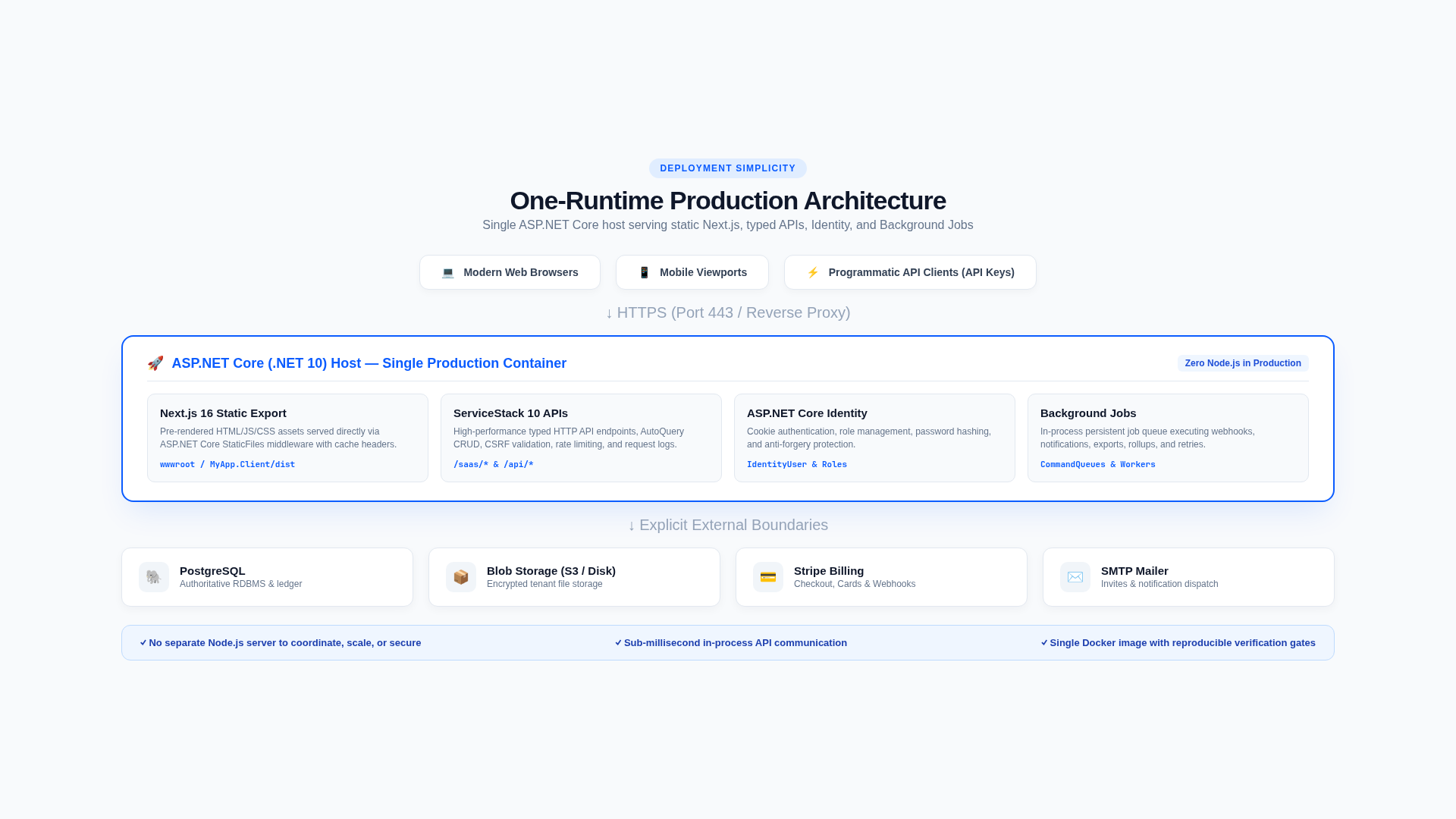
The production artifact is one ASP.NET Core application serving the statically exported Next.js client and typed ServiceStack APIs.
Build pipeline
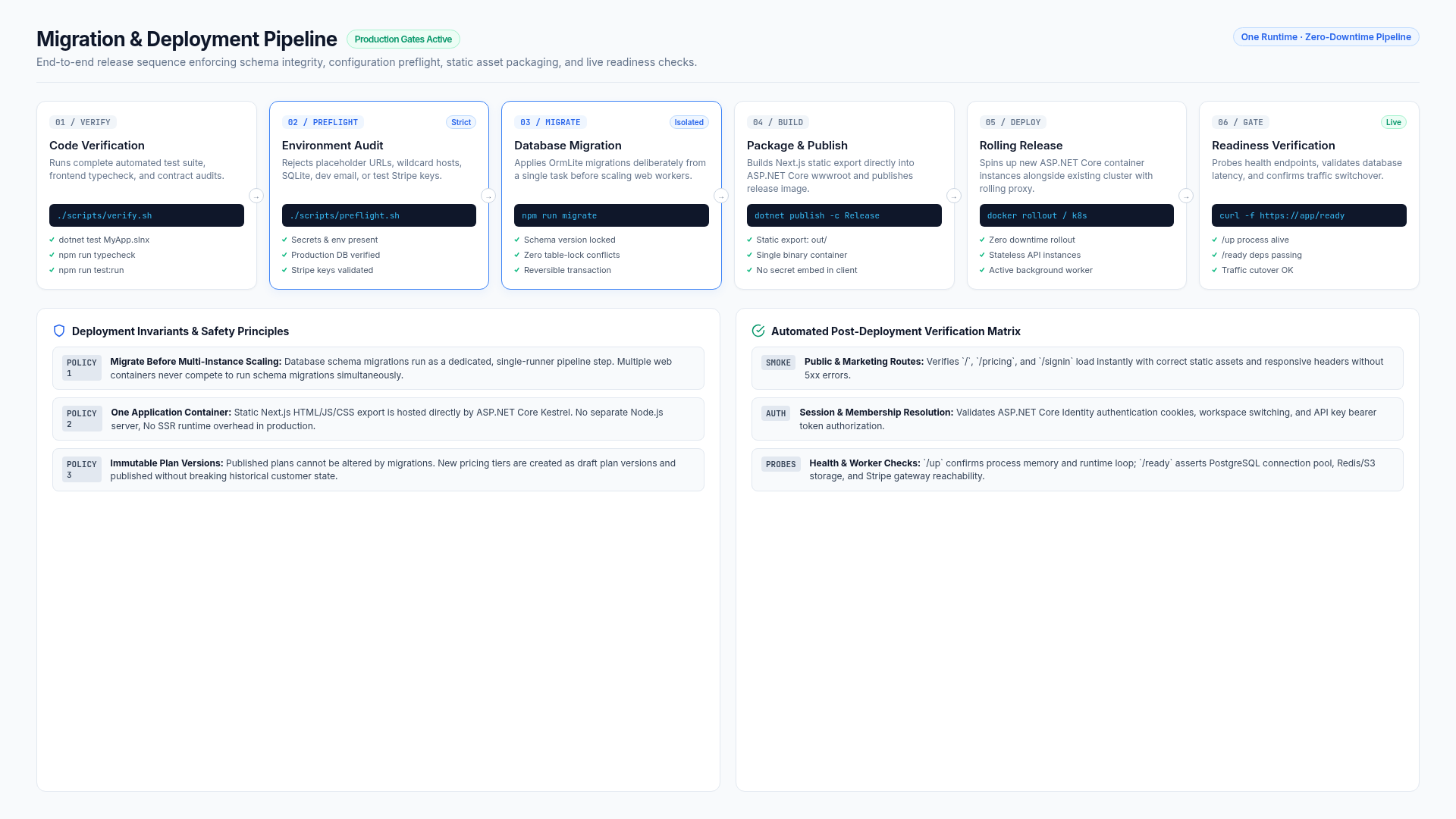
The checked-in GitHub workflows form three stages:
- Build restores .NET/npm dependencies, builds, tests, type-checks, and creates the static client export.
- Build Container uses .NET SDK container publishing to build and push both the verified commit SHA and
latestto GHCR. - Release checks out and deploys that same immutable commit image through Kamal, runs the migration app task, and requires
/readyto succeed.
config/deploy.yml configures Kamal Proxy TLS, /up rollout health checks, container port 8080, runtime secrets, and a durable App_Data volume. The image contains no ServiceStack, application, database, Stripe, or SMTP secret.
It is provider-agnostic. The database is selected by the DB_PROVIDER repository variable, which resolves a Kamal destination that merges config/deploy.<provider>.yml over it. See Choose a database.
Both downstream workflows accept manual dispatch. Automatic runs proceed only after the preceding workflow succeeds and use its exact head_sha; this prevents a newer branch tip from being deployed in place of the revision that passed CI.
First deployment prerequisites
Before pushing the release commit:
- create a Linux host reachable over SSH as
root, or configure Kamal's SSH user explicitly; - point the deployment hostname's A/AAAA record at that host and allow inbound TCP 80 and 443;
- choose the initial database profile: durable single-host SQLite for deployment validation, or PostgreSQL for production operation;
- configure SMTP and Stripe when those capabilities are part of this deployment;
- for Stripe, create the webhook endpoint at
https://your-host/stripe/webhookand retain its signing secret; - add the repository secrets below;
- run production preflight locally using values equivalent to the deployed configuration.
Kamal bootstrap installs Docker when needed and Kamal Proxy obtains the TLS certificate. DNS must resolve before Release runs.
GitHub repository secrets
| Secret | Purpose |
|---|---|
KAMAL_DEPLOY_IP | SSH destination for the deployment host |
KAMAL_DEPLOY_HOST | Public hostname without scheme or path |
SSH_PRIVATE_KEY | Private key authorized on the deployment host |
APPSETTINGS_JSON | Complete production configuration, including PostgreSQL, SMTP, Stripe, and product settings |
SERVICESTACK_LICENSE | Optional commercial ServiceStack runtime license; do not set it for the checked-in OSS license |
GitHub supplies GITHUB_TOKEN to publish and pull the repository's GHCR image. The package must be accessible to the deployment workflow; private packages are authenticated with that token.
Two checked-in configuration profiles provide the shortest path:
config/appsettings.deploy.sqlite.example.jsonvalidates a first single-host deployment without external database, mail, or billing infrastructure;config/appsettings.deploy.postgres.example.jsonenables the production PostgreSQL, SMTP, and Stripe policy.
Copy the appropriate profile to a gitignored local file, replace every example value, and validate that exact file:
cp config/appsettings.deploy.sqlite.example.json MyApp/appsettings.Production.json
./scripts/preflight.sh --json MyApp/appsettings.Production.json --config-only
gh secret set APPSETTINGS_JSON < MyApp/appsettings.Production.json
The PostgreSQL profile uses the same commands; only the source template changes. A production configuration bundle should include at least:
{
  "AppConfig": { "BaseUrl": "https://your-host" },
  "ASPNETCORE_FORWARDEDHEADERS_ENABLED": true,
  "AllowedHosts": "your-host",
  "Database": { "Provider": "PostgreSql" },
  "ConnectionStrings": { "DefaultConnection": "Host=...;Database=...;Username=...;Password=..." },
  "Notifications": { "Provider": "Smtp", "FromName": "Acme", "FromEmail": "noreply@your-host" },
  "SmtpConfig": { "Host": "...", "Port": 587, "UserName": "...", "Password": "...", "FromEmail": "noreply@your-host" },
  "Product": { "SupportEmail": "support@your-host" },
  "Stripe": { "PublishableKey": "pk_live_...", "SecretKey": "sk_live_...", "WebhookSecret": "whsec_..." },
  "Deployment": { "EnforceStartupChecks": true, "RequireNetworkDatabase": true, "RequireSmtp": true, "RequireStripe": true, "AllowTestStripeKeys": false }
}
Both profiles include a temporary BootstrapAdmin section. Customize it for the first release so the migration task creates an Identity user with the platform Admin role. After the first successful administrator sign-in, delete that section from the local JSON, upload APPSETTINGS_JSON again, and redeploy. The database user remains; the bootstrap password is removed from runtime configuration.
For a staging deployment that intentionally uses Stripe test mode, set Deployment.AllowTestStripeKeys=true and supply matching pk_test_ and sk_test_ credentials. Do not mix test and live keys.
Initial single-host SQLite validation
It is reasonable to validate the complete deployment path with SQLite before provisioning PostgreSQL. The checked-in Kamal volume preserves /app/App_Data, so the database, files, job state, request logs, and data-protection keys survive container replacement. Use only one application instance and back up the volume.
For this explicit temporary mode, override the production defaults:
{
  "Database": {
    "Provider": "Sqlite"
  },
  "ConnectionStrings": {
    "DefaultConnection": "Data Source=App_Data/app.db;Cache=Shared"
  },
  "Deployment": {
    "RequireNetworkDatabase": false
  }
}
Preflight reports warnings for this mode and succeeds without SMTP or Stripe because the profile explicitly disables those requirements. Registration still works with the development notification provider, but real invitation, recovery, and billing delivery is intentionally unavailable until those integrations are configured.
Do not scale beyond one instance with SQLite. For a disposable validation deployment, switch to PostgreSQL by replacing APPSETTINGS_JSON with the customized PostgreSQL profile and redeploying against an empty database. For a deployment containing customer data, switching the provider does not copy data: plan and test an export/import or ETL migration with downtime and backups.
Preflight
Validate a JSON configuration bundle directly without loading secrets into the shell:
./scripts/preflight.sh --json MyApp/appsettings.Production.jsonAlternatively, export production values without committing them:
set -a
source .env.production
set +a
./scripts/preflight.sh
Use --config-only only when the exact revision's build suite already passed in CI. Preflight applies the same Deployment policy switches as application startup. The PostgreSQL profile enforces the full production boundary; the SQLite profile deliberately relaxes the database, SMTP, and Stripe requirements and reports those choices as warnings.
Migration ordering
An empty database bootstraps itself on first start. Apply later migrations before the new revision serves traffic:
cd MyApp
dotnet run --no-launch-profile --AppTasks=migrate
The checked-in Kamal workflow runs this as a separate command against the deployed immutable image and then verifies /ready. Kamal uses /up to decide whether the process can receive traffic, so schema changes must remain compatible with the previously deployed application. Before operating valuable data or multiple instances, choose and test an ordering appropriate to the platform. Use expand/contract migrations so old and new application versions can overlap safely; do not depend on destructive schema changes during a rolling release.
Trigger and observe the release
Push the intended commit to main. GitHub Actions should progress through Build, Build Container, and Release. A failure stops the chain; do not manually dispatch a later stage to bypass a failed prerequisite.
For the first release, watch these checkpoints in order:
- Build tests and static export pass;
- the commit-tagged image is published to GHCR;
- Kamal connects over SSH and bootstraps Docker/Proxy;
- the application answers
/upon container port8080; - the migration app task succeeds;
- public
https://your-host/readyreturns success.
Rollout
- Route traffic only after
/readysucceeds. - Use
/upfor cheap process/container health. - Confirm the release revision and effective non-secret configuration.
- Complete a login, organization selection, read/write API call, file-store probe, and background-job check.
- Confirm Stripe endpoint deliveries and SMTP delivery in the target environment.
- Watch error rate, latency, failed queues, and database saturation during rollout.
Rollback
Roll back the application image only when the database schema remains backward compatible. Do not automatically reverse production migrations containing data transformations. Restore data only for actual data loss/corruption, not as a routine code rollback.
Keep the previous image reference, migration record, configuration version, and recovery owner in the release record.
Scaling constraints
Before adding instances:
- use PostgreSQL;
- replace local
IFileStorewith shared object storage; - share/protect ASP.NET data-protection keys;
- replace the in-memory API-key limiter with a distributed limiter;
- confirm ServiceStack job queue ownership/concurrency across instances;
- export logs, metrics, and traces centrally.
Related documentation
Secrets
Production secrets belong in a platform secret manager or protected deployment environment, never in Git, browser bundles, logs, audit metadata, screenshots, or support notes.
Database and storage
The RDBMS is authoritative for Identity and SaaS metadata. IFileStore is authoritative for uploaded/exported bytes, linked by opaque object keys.